
The flagship worked example: a clinic where every part of UniFi does its job at once. Network, Wi-Fi, cameras, both doors controlled, intercom, every jack live and certified.
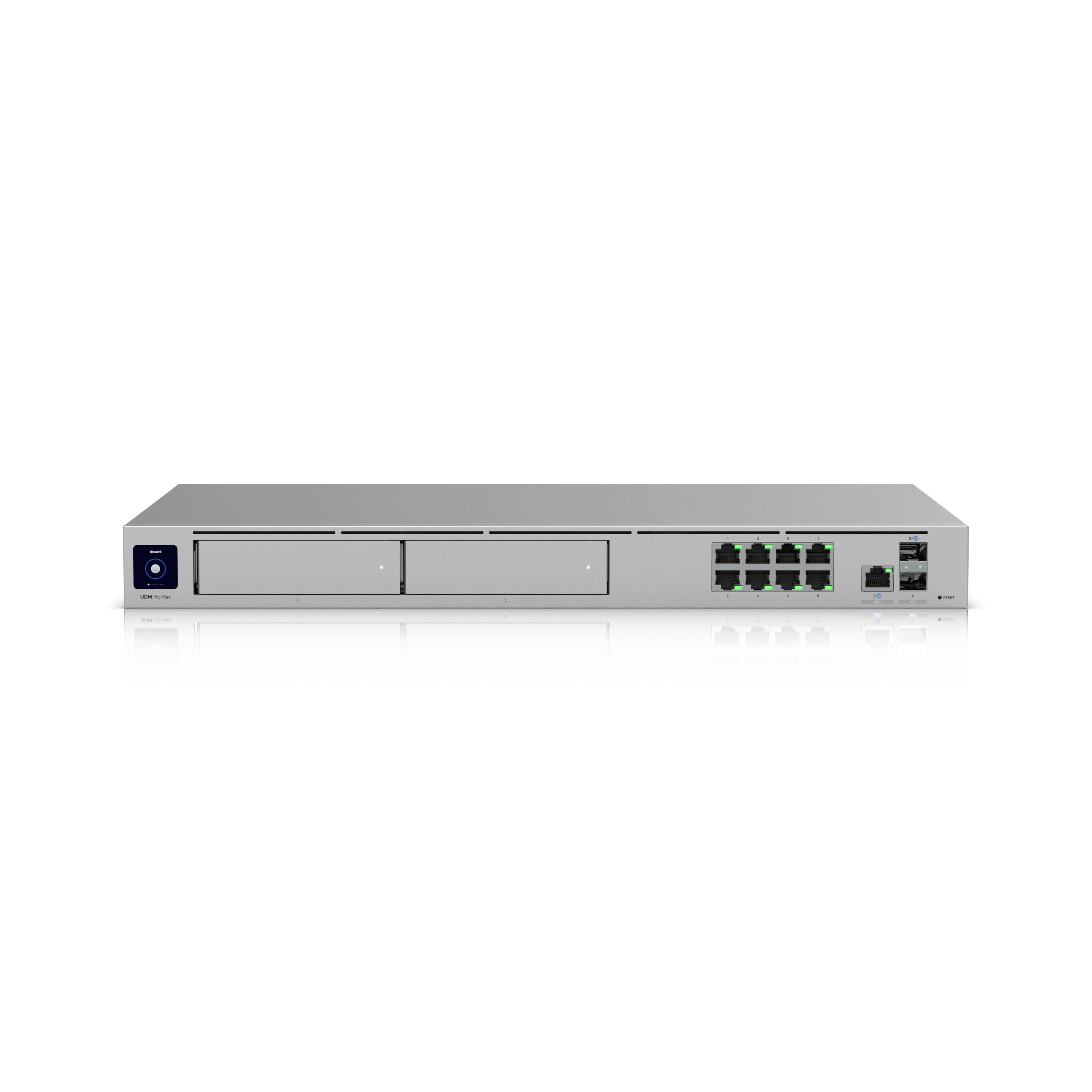
The centre of the build: a UDM-Pro-Max ($926) and a USW Pro 48 PoE, with a mix of cameras chosen on purpose. $8,866 all-in for the priced hardware.
The thing to read before quoting: choosing the plain UDM-Pro puts the recorder at its ceiling on day one, and mechanical egress on controlled doors is mandatory, not a preference.
One more thing this page says plainly: it gives no legal or compliance advice. Where recordings live and who can see them are questions for your own professional advice. We build it properly and document it.
Everything below is the detail: the full build, why 48 ports, the camera mix, both doors done right, and the failure list.
A worked example, not a specific customer project, illustrative reference design showing how the pieces fit.
Hardware prices verified 16 July 2026. Ubiquiti pricing changes, we confirm current pricing on every quote. Prices are indicative CAD, all-in. Contact AVNFi for a current quote.
The scenario
A clinic. Reception and waiting room at the front, a corridor of operatories, a sterilisation area, a staff room, an office, and a back door onto the alley or the parking lot.
Everything: network, WiFi, cameras, controlled doors, intercom. Front and back doors both controlled, so staff badge in at 6:30am and the back door isn’t propped open with a chair. Every jack live, every jack certified.
This is the flagship. The build where every part of UniFi is doing its job at once, and where the pieces genuinely have to fit together.
The build
Priced
| Qty | Item | All-in each | Total |
|---|---|---|---|
| 1 | UDM-Pro-Max. Gateway + camera recorder, 1U, 2 drive bays | $926 | $926 |
| 1 | USW-Pro-48-PoE. 48-port PoE switch, 600W, 1U | $1,617 | $1,617 |
| 2 | G6 Pro 360. 360° fisheye cameras | $771 | $1,542 |
| 2 | G6 180. 180° panoramic cameras | $462 | $924 |
| 4 | G6 Turret. 4K cameras | $307 | $1,228 |
| 2 | UA-Hub-Door. Door controller, one per door | $307 | $614 |
| 2 | UA-G3-Flex. NFC + keypad readers | $301 | $602 |
| 2 | UACC-Lock-Strike-Secure-15mm. Fail-secure strikes | $129 | $258 |
| 2 | U7 Pro. Ceiling access points | $257 | $514 |
| 2 | PoE Smart Chime | $105 | $210 |
| 1 | UPS-2U. Rack UPS, 2U (back in stock, see note) | $431 * | $431 |
| Priced subtotal (indicative CAD, all-in) | $8,866 |
Only the UPS-2U is not yet fully verified: it is back in stock as of 2026-08-25, but its current price has not been re-confirmed in the cart. We confirm current pricing on every line before a quote goes out.
The strikes are $129 each and the chimes $105 each.
Tighter budget? A UDM-Pro ($588, cart-verified) drops the subtotal by $338, to roughly $8,528, and this design no longer recommends it. It records 8 cameras at 4K, and this design has 8. See what breaks if you undersize below before choosing it.
Confirmed before quote, not priced here
We don’t print numbers we haven’t verified. These are in the design; they’re not in the total.
| Qty | Item | Status |
|---|---|---|
| 2 | UA-Intercom-Viewer, interior answer points | SOLD OUT as of 2026-07-16, unavailable, not quotable. No price captured. Optional to the core build, see note. |
| 2 | Mechanical egress hardware (push bar / push pad) | Third-party. Priced at source. See the door section, this is not optional. |
| 1–2 | Drives, 3.5″ CMR, sized to retention | Third-party. |
| 1 | Rack, patch panel, cable, mounts | Site-dependent. |
| n/a | Fluke channel certification, all jacks | Separate line, always. |
| n/a | Labour | Separate. |
So the honest total is “$8,866 of Ubiquiti hardware, plus door egress hardware, drives, rack and certification”, and of that $8,866, every line except the UPS-2U is cart-verified; the UPS-2U is back in stock but its price has not yet been re-verified in the cart. We will not pretend otherwise. Note: UPS-2U is back in stock as of 2026-08-25, after being Sold Out since before this design was written. Confirm current stock and price before quoting. Note: UA-Intercom-Viewer is Sold Out as of 2026-07-16. Ubiquiti lead time is typically 7–10 days once it’s back in stock. It is optional to the core build, the network, cameras and both controlled doors all work without it. What you lose is the workflow: reception answers the back door from the desk instead of walking down the corridor. The rest of the build does not wait on it, and it can be added later without touching anything else. Confirm availability before quoting.
Why each choice
UDM-Pro-Max, the gateway, and it records everything
1U, 5 Gbps routing, 200+ devices, 2,000+ clients. Runs Network, Protect and Access from one box, one interface for the network, the cameras and the doors. No separate recorder, no separate access controller, no third server under a desk.
It records 15 cameras at 4K, and you have 8. That’s the point: roughly half the recorder spare on day one, so the ninth camera (the one that arrives with the next operatory) just plugs in. It also has two 3.5″ drive bays rather than one, so recordings can survive a drive failure.
Why not the UDM-Pro at $588? Because it records exactly 8 cameras at 4K and this design has exactly 8. Eight cameras on an eight-camera limit is zero headroom on the day the installer leaves, and the gateways page says to buy for the bay, not the day. Specifying a gateway at 100% of its recorder capacity contradicts our own advice, so this design doesn’t do it. The clinic that adds an operatory in year two asks for a ninth camera, and on a UDM-Pro that camera does not fit, it needs a whole second recorder to exist. $338 now buys seven spare camera slots and a second drive bay. That is the entire argument, and it is the most important thing on this page.
USW-Pro-48-PoE, the switch, and why 48
$1,617 all-in, cart-verified 2026-07-16 ($1,499 base + $118 memory surcharge). 600W PoE budget, 48 ports, PoE++ capable, Layer 3. It’s the second-biggest line on the build, and it is now a read number rather than a gap.
Count what plugs in:
| Ports | |
|---|---|
| 8 cameras | 8 |
| 2 access points | 2 |
| 2 door hubs | 2 |
| 2 readers (via hubs) | n/a |
| 2 intercom viewers | 2 |
| 2 chimes | 2 |
| Reception, office, staff room, sterilisation | ~6 |
| Operatory drops (chairside PCs, imaging, sensors) | ~12 |
| Printers, uplink, spare | ~4 |
| ~38 of 48 |
“All jacks live” is the requirement, and it’s what sizes the switch. A clinic’s operatories each need drops for the chairside PC and the imaging sensor, and digital X-ray isn’t something you leave on WiFi. 24 ports doesn’t fit. 48 does, with a decade of room.
PoE++ is the non-negotiable part. The door hubs need it. Most compact switches can’t do it at all, see the failure list below.
The cameras, a mix, on purpose
| Where | Camera | Why |
|---|---|---|
| Waiting room, operatory corridor | 2× G6 Pro 360 ($771) | One fisheye covers a whole room. 12MP, 360°, digital pan-tilt-zoom after the fact. IK10 impact-rated. One camera instead of three, and you can zoom into recorded footage afterwards. |
| Reception desk, back corridor | 2× G6 180 ($462) | 16MP, 7680×2160, 180° flat panorama. Built for a wide space you want in one frame, a reception counter and its whole approach, without a blind spot at either end. |
| Front entry, back door, alley, parking | 4× G6 Turret ($307) | The workhorse. 4K, 30m night vision, IP66. Exterior and entry points where you want a conventional, aimed view. |
Why not eight Turrets for $2,456? Because a 360 covers a waiting room that would otherwise take three Turrets, and the 180 catches a counter end-to-end. The mix is fewer cameras, fewer cable pulls, fewer recorder slots, and fewer blind spots. Eight Turrets is cheaper on the BOM and more expensive installed.
The doors, two controlled, front and back
Per door: UA-Hub-Door + UA-G3-Flex reader + fail-secure strike + mechanical egress.
UA-Hub-Door ($307), one hub per controlled door. 5 GbE ports, 2 lock terminals, 2 aux. PoE++, up to 50W, it’s rated for the lock current it passes through, not just its own electronics. These are the biggest PoE loads on the job. Bigger than any camera.
UA-G3-Flex ($301). NFC card and keypad, Touch Pass. Weather range -30 to 60°C, which matters on a Calgary back door. This is the current-generation reader. (There’s an old part number “UA-G3-Entry” floating around in documents, it doesn’t exist. The line is UA-G3, UA-G3-Flex, UA-G3-Pro.)
Intercom viewers, someone rings the back door, reception answers from the desk. UNAVAILABLE: Sold Out as of 2026-07-16, verified. No price is shown for it here because it cannot currently be bought or cart-verified. (7–10 day lead time when back in stock.) Optional to the core build and addable later.
Fail-secure strikes ($129 each, cart-verified, no memory surcharge), the lock stays locked when power is lost. For a clinic with controlled substances and patient records, that’s the correct choice, and it’s the whole reason to control the door.
And that is exactly why mechanical egress is mandatory
A fail-secure strike stays locked in a power failure. So every controlled door in this design has mechanical egress, a push bar or push pad that opens the door with no power, no network, and no electronics anywhere in the path. Push the bar, the door opens. Always. That is AVNFi’s design practice and it is not a line item you can remove to save money.
Local building and fire code, and your Authority Having Jurisdiction, govern egress and must be confirmed for your specific doors and occupancy. We design to this practice; the AHJ decides. Nothing on this page is code, legal or compliance advice, and we won’t pretend otherwise.
Two things to settle before install, because they’re scope, not code:
- Is the existing deadbolt replaced or supplemented? A deadbolt left alongside a fail-secure strike is a second lock on the egress path, and a second thing that can be locked when it shouldn’t be.
- Is keyed override confirmed? Mechanical egress covers getting out. Getting in during a total power and network failure is a separate question with a separate answer.
Door hubs are rated 0–40°C. The hub goes inside, in the ceiling or the rack, not in an unheated back vestibule.
The rest
2× U7 Pro, one for the front (patient guest WiFi, staff tablets), one for the back. Guest WiFi is segmented from the clinical network. That’s configuration, not hardware, and it’s included.
2× chimes, door events audible where staff actually are.
UPS, 1.44kVA, ~8 min at half load. The gateway is your recorder and your door controller. When the power blips, it shuts down cleanly instead of having the drive yanked out from under it. (Graceful Shutdown needs UniFi OS 4.4.3+.)
Fluke channel certification, every jack tested, results documented. Always a separate line, always offered. On a clinic running digital imaging, “the jack works” and “the jack is certified to spec” are different claims, and only one of them is worth anything in a year.
Power check
| Devices | Each | Draw |
|---|---|---|
| 2× G6 Pro 360 | 13.5W | 27W |
| 2× G6 180 | 15W | 30W |
| 4× G6 Turret | 12.5W | 50W |
| 2× U7 Pro | 21W | 42W |
| 2× UA-Hub-Door | 50W | 100W |
| 2× UA-G3-Flex | 5W | 10W |
| 2× Intercom Viewer | 5W | 10W |
| 2× PoE Smart Chime | 3W | 6W |
| Total worst case | 275W |
Against the USW-Pro-48-PoE’s 600W: 46% loaded. Comfortable, with the room a clinic will use.
Note what’s biggest. The two door hubs are 100W, more than all eight cameras combined (107W is close, but the hubs are two devices against eight). Doors, not cameras, size the power on a commercial job.
What breaks if you undersize
⚠️ Choosing the UDM-Pro puts the recorder at 100% on day one, the most important line on this page
The UDM-Pro records 8 cameras at 4K. This design has 8 cameras. Spec the UDM-Pro and you are at 100% of the recorder before the install is finished.
Camera nine does not fit. Not “will be slow”, does not fit. And a clinic that adds an operatory adds a camera.
That is why this design specs the Max. Three honest options:
| Option | Cost | Verdict |
|---|---|---|
| UDM-Pro-Max, as specced | $926 ✓ | 15 cameras at 4K (8 used, 7 spare), plus a second drive bay so recordings survive a drive failure. On a clinic, this is the right call, and $338 is not the expensive part of this project. |
| UDM-Pro instead | $588 (−$338) | Correct only if 8 cameras is genuinely final. Zero headroom, one drive bay. Cart-verified ($545 + $43). |
| UDM-Pro now, UNVR later | $588 + $430 | Works. Two recorders in one rack. $430 later to avoid $338 now. |
We’d have this conversation before ordering, not after.
The rest of the failure list
A 24-port switch instead of 48. ~38 ports needed. It doesn’t fit. “All jacks live” is the requirement, a 24 means an unmanaged switch behind reception, which is exactly the thing this build exists to prevent.
A USW-Ultra-210W ($307) to save on the switch. It cannot power the door hubs. At all. The Ultra family is PoE+ maximum, 30W per port; the hubs need PoE++ at 50W. This is a port-class ceiling, no amount of budget fixes it. Plus: 7 ports against 38, and its 202W only exists with its bundled adapter (16W on PoE+ input). Three separate ways this fails.
Eight Turrets instead of the mix. Saves ~$1,238 on the BOM. Costs more installed (more cameras, more pulls, more recorder slots) and leaves blind spots in the waiting room the 360 wouldn’t have.
Skipping the intercom viewers. Reception can’t see who’s at the back door and someone walks down the corridor to look. That’s a workflow you lose, not a system that breaks, the viewers are optional to the core build, and they’re Sold Out as of 2026-07-16 in any case. Add them when stock returns.
Skipping mechanical egress. Not a cost decision. See above.
Consumer TVs as viewing displays. Consumer warranties generally exclude commercial-premises use, putting one in a clinic can void it. Use a commercial-rated display or the Protect Viewport ($269).
The expansion path
| Want | Do | Cost |
|---|---|---|
| Camera 9–15 | Already covered. The Max records 15 at 4K. Plug it in. | $0 (camera only) |
| Camera 16+ | Recorder’s full. UNVR ($430) as a second recorder. | $430+ |
| A third controlled door | UA-Hub-Door + reader. Ports and PoE++ are already there. | ~$608 |
| Interior door (lab, drug storage) | UA-Hub-Door-Mini, or UA-Ultra (reader+hub in one, $188). Note: UA-Ultra doesn’t work with standalone hubs, it’s all-in-one or nothing. | $188+ |
| Fingerprint at a sensitive door | UA-G3-Fingerprint. | see catalogue |
| Front-door intercom | UA-Intercom ($13W). | see catalogue |
| File storage / imaging archive | UNAS-Pro ($771). 7 bays, 10 Gbps. Not a camera recorder, a NAS. | $771 |
| Longer retention | Bigger drives. | drives only |
| More desks | ~10 ports spare. | $0 |
The ceilings, in order: ports (~38 of 48) → recorder (8 of 15× 4K) → watts (46%). With the Max, ports become the first wall instead of the recorder, which is the whole reason to spec it. On a UDM-Pro the order flips and the recorder is the wall on day one.
A note we’re not going to skip
This wiki gives no legal or compliance advice, and this page is where that matters most.
A clinic runs cameras and door logs over spaces where patients and staff move. Where recordings live, who can see them, and how long they’re kept are real questions with real obligations attached, and they are questions for your own professional advice, not for an installer’s reference page.
What AVNFi does: build it properly, document it, and tell you plainly what the system records and where it’s stored. What AVNFi doesn’t do: tell you what your obligations are. Ask someone qualified. We’d rather say that than guess.
Prices indicative CAD, all-in, hardware at the store price, labour separate. Ubiquiti reprices without notice; lead time ~7–10 days. Verified against ca.store.ui.com and techspecs.ui.com 2026-07-16.