
This page covers what a business buys that a house does not: doors, cold, ruggedness, alarms and scale.
The decision that quietly ruins Canadian door projects, so it goes first: the standard Door Hub is rated 0 to 40°C. It does not go below freezing. An unheated vestibule, gate or loading bay in Calgary puts it outside its rating for half the year; the Gate Hub, rated to minus 30, is the answer when it cannot go there.
The second line to remember: a fail-secure door needs a mechanical way out. Always. And the AHJ, not us, decides what your building requires.
Everything below is the detail: door hardware piece by piece, fail-secure versus fail-safe, industrial and fanless gear, sensors, enterprise scale, and what a commercial buyer needs that a homeowner never will.
What a business buys that a house doesn’t: doors, cold, ruggedness, alarms and scale.
Specs checked 17 July 2026. Ubiquiti pricing and stock change; we confirm current pricing on every quote. Prices are indicative CAD. Contact AVNFi for a current quote.
1. The one thing to read first: cold
This is the decision that quietly ruins Canadian door projects, so it goes at the top.
UniFi’s standard Door Hub is rated 0 to 40 °C. It does not go below freezing.
Not “it struggles”. Not “it’s a bit slow in winter”. Ubiquiti publishes 0 to 40 °C and that’s the rating.
If your controlled door is an unheated vestibule, a warehouse door, a gate, a loading bay or an outbuilding, in Calgary that hub is outside its rating for roughly half the year.
| Device | Ubiquiti’s published operating temperature | What that means here |
|---|---|---|
| UA-Hub-Door | 0 to 40 °C | Heated space only. Not a vestibule, not a gate, not an unheated warehouse. |
| UA-Hub-Door-Mini | 0 to 40 °C | Same limit. Same rule. |
| UA-Hub-Gate | −30 to 60 °C | This is the cold-capable one. Gates, unheated doors, outbuildings. |
| UA-Ultra | −30 to 40 °C | Cold-capable reader/hub. |
| UA-G3-Pro (reader) | Device: −30 to 45 °C. Display: −10 to 45 °C. | The device survives. The screen only rates to −10 °C, so the display is the weak link, not the electronics. |
| EAH-8 (Enterprise Access Hub) | 0 to 40 °C | Heated equipment room only. |
| UACC-Lock-Strike-Secure-15mm | −10 to 60 °C | The strike itself is fine well below the hub’s limit. |
| UCG-Industrial (gateway) | −30 to 50 °C | Rugged. Fanless. Built for exactly this. |
| UP-Siren-PoE | −30 to 50 °C | Fine outdoors in winter. |
How to read that table: the hub is almost always the limiting part, not the lock and not the wire. The strike is rated colder than the hub that drives it.
So the rule, plainly: if the equipment lives anywhere that isn’t heated year-round, the Gate Hub (−30 to 60 °C) is the design, not the Door Hub. And if a reader with a screen is going somewhere that hits −10 °C, expect the display to be the part that complains first.
This is not a small footnote. For a Calgary vestibule, gate or warehouse door, this table is the entire decision.
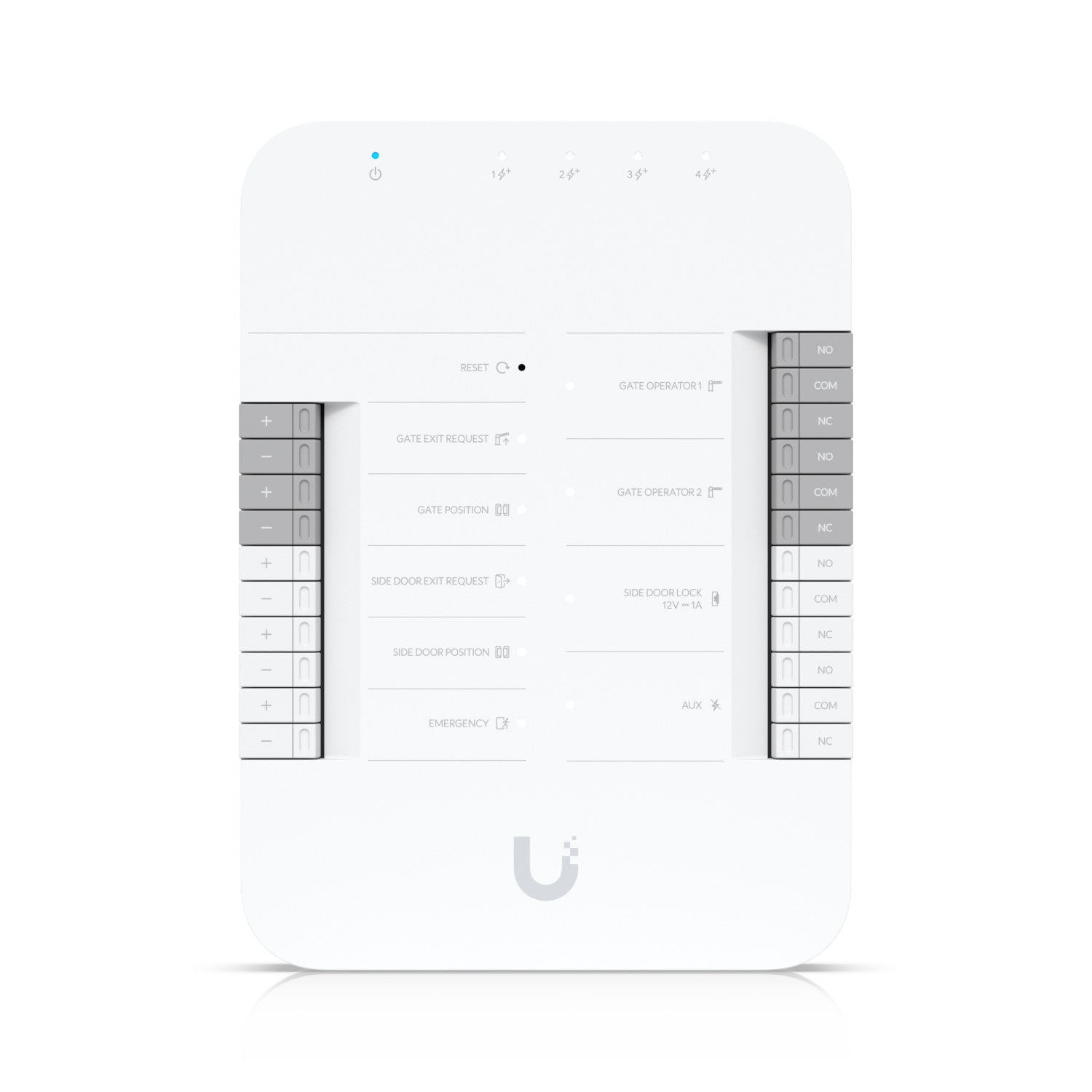
Gate Hub: −30 to 60 °C
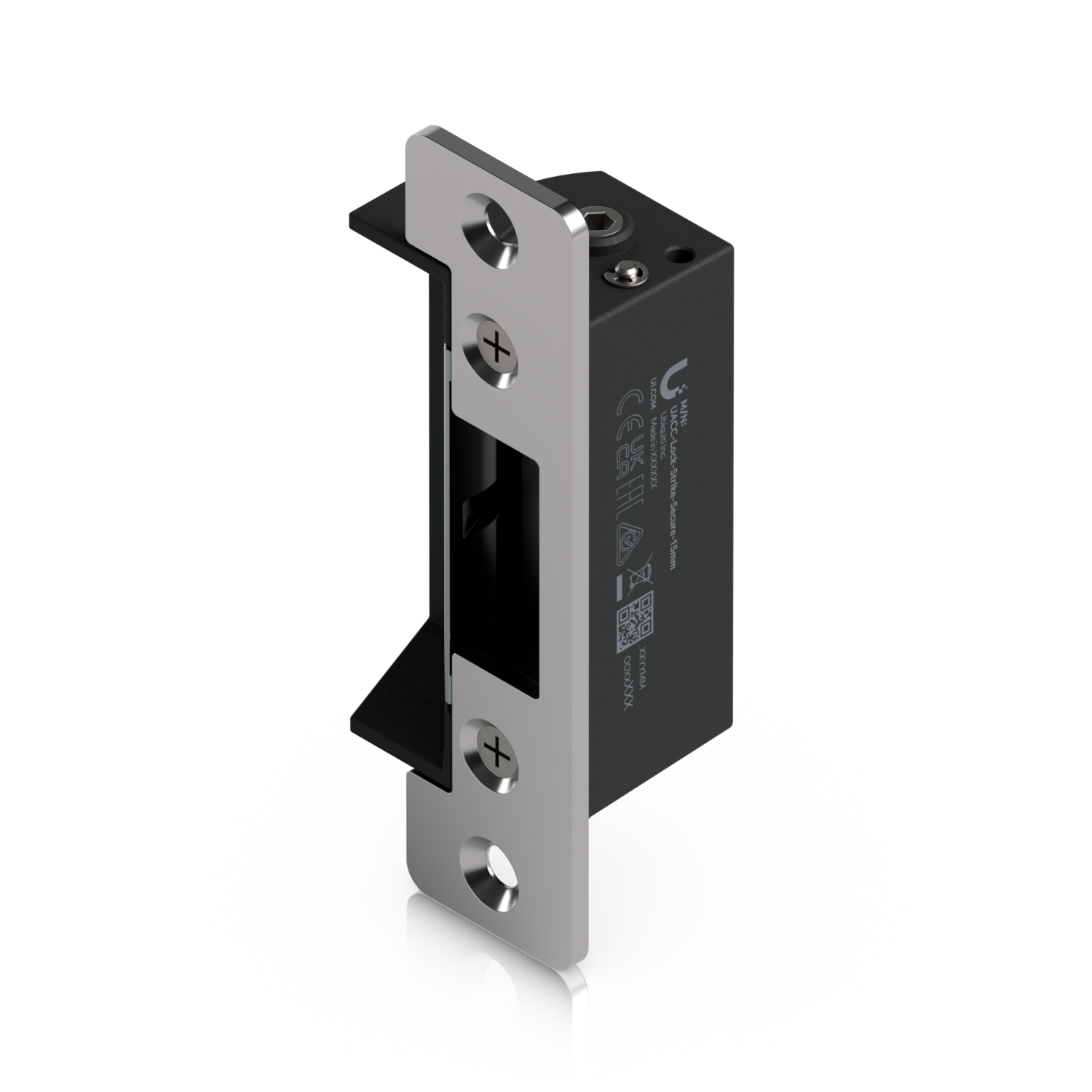
Fail-Secure Strike Lock: $129, no surcharge
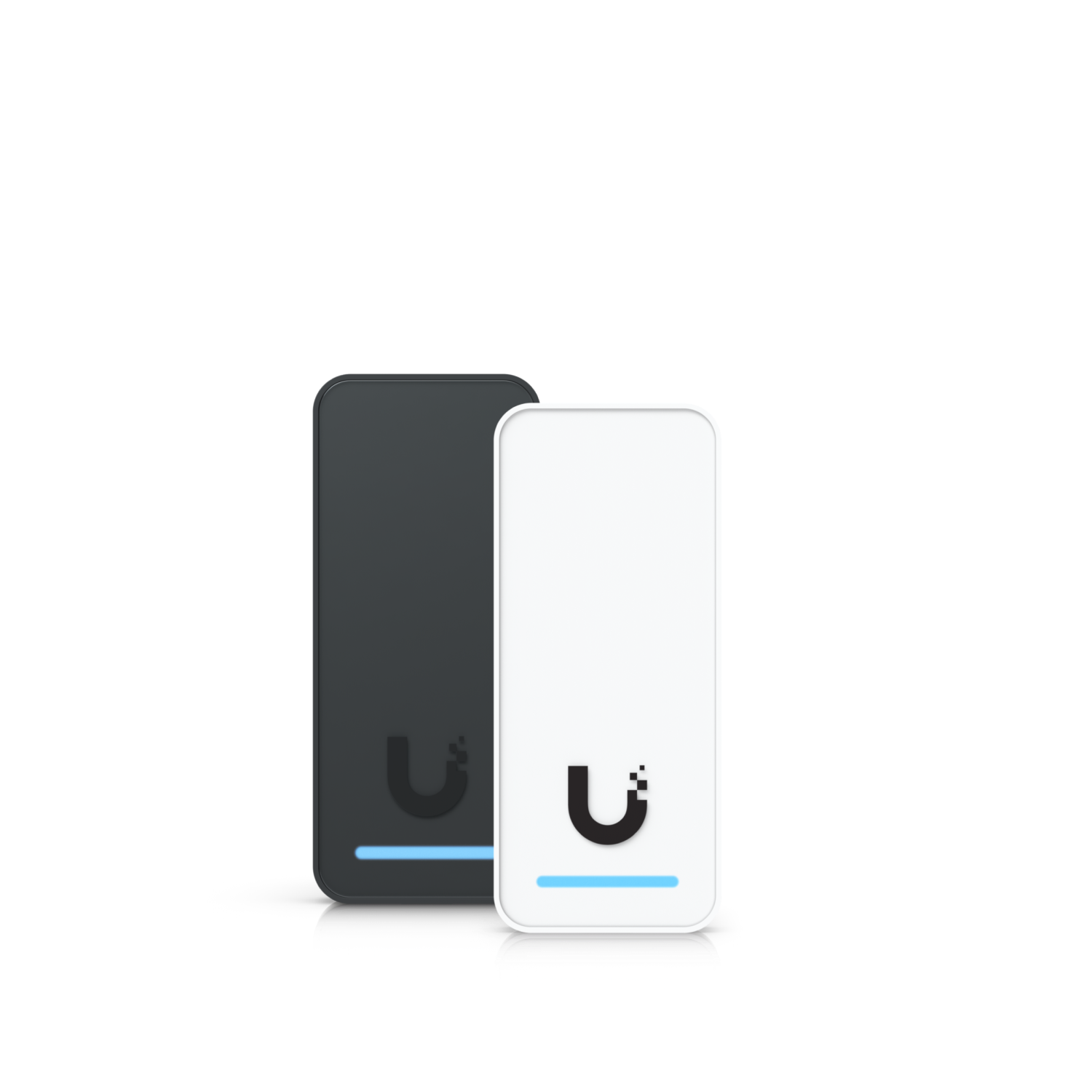
G3 Reader
2. Door hardware
Specs from techspecs.ui.com. Compatibility read from ca.store.ui.com product pages. Checked 2026-07-16/17.
The strike
UACC-Lock-Strike-Secure-15mm: $129, all-in.
And there’s a detail here that matters on any door-heavy build:
It carries no memory surcharge. Zero.
$129 on the page, $129 at the checkout. We checked. Most powered UniFi devices get 7.43–7.89% added invisibly at checkout, so a line that doesn’t is worth knowing about on a ten-door job.
What we can’t tell you is which other lines are exempt. Exemption doesn’t follow the category: a USW-Flex-Mini switch and a $1,005 UVC-AI-MS-2 camera also come up $0, while other switches and cameras are surcharged normally. So we don’t predict it. We read every line from the checkout before it goes on a quote.
The facts:
| Holds | 1,200 kg (2,645 lb) |
| Frames | Aluminium, steel or wooden door frame |
| Variants offered | Strike/Bolt · Fail-Secure/Fail-Safe · Standard/Narrow |
| In the box | Short and long front plates both included |
| Operating temperature | −10 to 60 °C |
| Works with | UA-Hub-Door · UA-Hub-Door-Mini · UA-Hub-Gate · EAH-8 · UA-Ultra. That is the complete list. |
| Price | $129 all-in, no surcharge |
That compatibility list is the whole list. Five hubs. If a hub isn’t on it, don’t assume.
The rest of the door
| Product | What it is | Price (CAD) |
|---|---|---|
| UACC-PanicBar | Mechanical exit device. Push to open. Certified UL 305, UL 10C, CAN/ULC-S132, ANSI/BHMA A156.3 Grade 1. Non-handed and reversible. Dry output, 30V DC 1A. | $570 |
| Door position sensors | Tells the system whether the door is actually shut, not just whether it was told to lock. On any door that matters, this is not optional. | Ask us |
| Door lock relay cable | The wire from hub to lock. Small line, non-negotiable line. | Ask us |
The panic bar is worth understanding. It is a mechanical device. It has no power method, no network port, no firmware. Pushing it opens the door. That property is the whole reason it exists, and it’s the reason the next section is written the way it is.
3. Fail-secure vs fail-safe, and the egress rule we don’t bend
In plain English:
| Fail-secure | Fail-safe | |
|---|---|---|
| Power fails, the door… | stays locked | unlocks |
| Protects | the stuff inside | the people inside |
| Typical use | offices, stock rooms, server rooms, exterior doors | designated fire-egress doors, stairwells |
| The catch | people can’t get out electrically | anyone can get in during an outage |
That’s it. That’s the whole distinction. Everything else is detail.
AVNFi standard practice, stated plainly
A fail-secure strike stays locked when the power fails. So the way OUT must be MECHANICAL.
A push bar or a push pad that works with the power off, the network down and the building dark. No hub involved. No relay involved. No firmware involved. You push, it opens.
We don’t design a fail-secure door any other way. If someone is inside, there is a mechanical way out, or it isn’t our design.
This is why we specify the panic bar as mechanical hardware and not as an electronic feature. A door that needs a working relay to let a person out is a door that traps a person when the relay stops working. Fire, outage, cut cable, dead switch, firmware bug: all the same door, all the same result.
A fail-safe lock is not a substitute for mechanical egress either. It unlocks on power loss, which is not the same thing as still working when the wiring is damaged.
And now the part we don’t get to decide
Local code and the Authority Having Jurisdiction (AHJ) govern this. They must be confirmed before anything is installed.
- This page is not legal advice and it is not a code interpretation. Nothing on it should be relied on as either.
- Which doors are egress doors, what hardware they require, and what’s permitted is decided by your local building and fire code and by your AHJ, not by us, and not by a product page.
- Fire, life-safety and egress work belongs with a licensed trade and needs the AHJ’s confirmation. Get it in writing.
- We’ll design to it and we’ll say so out loud when a plan looks wrong, but the ruling isn’t ours, and we won’t pretend it is.
If you take one line from this section: the mechanical way out is our standard, and the AHJ is the authority. Both. Always.
4. Industrial and rugged
For sites that aren’t offices: shops, warehouses, yards, plants, unheated buildings.
| Product | Why an industrial buyer wants it | Price (CAD) |
|---|---|---|
| UCG-Industrial | Rugged, fanless gateway. −30 to 50 °C. 5 Gbps IPS, 50+ UniFi devices, 500+ clients, 50 managed access hubs. PoE+++ ports at 90W each, total PoE budget 270W on the 350W DC supply (75W on ATX). Wall, desktop or rack (rack accessory sold separately). Records (5) 4K cameras to a pre-installed 128 GB microSD. | $895 |
| Outdoor-rated cameras | Yards, loading bays, perimeters. Ubiquiti publishes field of view in degrees, not millimetres. If someone quotes you a mm figure, they made it up. | See Choosing Cameras |
| UACC-PoE+++ adapters | Powers the high-draw devices that PoE+ can’t reach. | Ask us |
| Ethernet Surge Protection (Outdoor) | Protects an exposed run at both ends. | $17 |
Fanless is not a luxury spec
Fans are the part that dies. In a shop, a warehouse or a plant, the air has dust, sawdust, metal filings or grain in it, and a fan is a machine for pulling all of it into your gateway. UCG-Industrial has no fan. For a dirty environment that’s worth more than any number on the box.
The −30 to 50 °C rating is the other half. Most gateways stop at 40 °C and 0 °C. This one doesn’t.
When is surge protection genuinely needed?
Honestly? Less often than it’s sold, and more often than people think. It’s $17. The rule we use:
- Any cable that leaves a building and comes back into one: a camera on a pole, a bridge on a mast, a gate hub across a yard. Yes. Fit it. Both ends.
- Any run to a detached structure, even a short one. Yes.
- A camera under a soffit, fed from inside the same building. No. It’s not exposed. You’re protecting against nothing.
- Anything on a mast, a roof or a pole. Yes, and this is the case where it earns its money.
Why: a nearby strike doesn’t need to hit the cable. It induces a surge into any long conductor near it, and that surge walks straight into your switch. $17 at each end of an exposed run, versus a switch and everything plugged into it. That’s the whole calculation.
5. Sensors and alarms
| Product | What it does | Price (CAD) |
|---|---|---|
| USL-Gateway | The hub for the SuperLink sensor line. | $199 |
| USL-Motion | Motion sensor. Battery (CR123A). 0 to 40 °C: indoor, heated. | Ask us |
| USL-Entry | Door/window entry sensor. Battery (CR123A). 0 to 40 °C: indoor, heated. | Ask us |
| USL-GlassBreak | Hears a window go. Storefronts, ground-floor offices. | $85 |
| USL-FOB | Keyfob: arm and disarm without the app. | $55 |
| UP-Siren-PoE | PoE siren. −30 to 50 °C; genuinely fine outside in winter. 5W. | $167 |
| UP-AI-Speaker | Speaker with AI features. | Ask us |
| UP-AirQuality | Air quality sensor. Vape detection, the reason schools and washrooms buy it. Nobody wants a camera in a washroom; this is what goes there instead. | Ask us |
| AI-Key | Spec sheet on request. | $1,235 |
| UP-AI-Port | Spec sheet on request. | $307 |
Note the cold again. USL-Motion and USL-Entry are 0 to 40 °C. They are indoor, heated-space sensors. Do not spec them for an unheated warehouse in January. UP-Siren-PoE at −30 to 50 °C is the outlier that genuinely handles a Canadian winter.
On AI-Key and UP-AI-Port: Ubiquiti lists them at the prices above. Ask, and we’ll pull the current spec sheet rather than guess.
6. Enterprise scale
When the building gets big enough that the all-in-one boxes stop being the answer.
| Product | What it’s for | Price (CAD) |
|---|---|---|
| UDM-Beast | The top of the Dream Machine line. 25 Gbps, 7,500+ clients, 750+ devices, 40× 4K cameras, two 3.5″ bays. | $2,319 all-in |
| ENVR | Standalone enterprise recorder. Separates recording from the gateway. (16) bays, 70× 4K. | $2,890 all-in |
| ENVR-Core | The larger recorder. (16) bays, 300× 4K, hot-swap power. | $7,736 all-in |
| EFG (Enterprise Fortress Gateway) | 12.5 Gbps, 5,000+ clients, 500+ devices. Not published as Protect-capable: no cameras in this box. | $2,879 all-in |
| EF-Core (Enterprise Firewall Core) | 79 Gbps, 22,500+ clients. Also not a recorder. | $5,415 all-in |
| E7 | Enterprise access point. 10 GbE + 1 GbE, PoE++, 43W. | $771 all-in |
The step that catches people: EFG and EF-Core are firewalls, not recorders. Moving up from a UDM-Beast to an EFG doesn’t get you more cameras; it gets you zero cameras in the box, and you add an ENVR alongside. That’s not a downgrade, it’s a different architecture: the brain stops being the tape room. But you need to know it before you order, not after.
See Choosing a Gateway for the full ladder.
7. What a commercial buyer needs that a homeowner doesn’t
This is the honest list, and it’s mostly not products.
- A rack. Somewhere for it all to live, locked, ventilated, and not on a shelf in a cupboard. Homes get away without one. Businesses don’t.
- A UPS. When the power blinks, a home reboots and everyone shrugs. A business loses recording, loses door logs, and possibly loses the doors. A UPS is the difference between an outage and an incident.
- Redundancy. Two drives instead of one. A second WAN. A gateway that can be swapped in an hour. Ask yourself what breaks if any one box dies at 3am on a long weekend.
- PoE headroom. Don’t buy a PoE budget that exactly fits today. Buy the one that fits the two cameras you’ll add. See Switches and PoE.
- Retention. A homeowner wants “did I see the parcel”. A business wants “show me last month”. That’s a drive-size question and it’s decided at purchase. See Storage and Retention.
- Access logging. Who opened which door, when. That’s a real reason businesses buy Access and homes usually don’t, and it’s also a records question, so decide early who can see it and for how long you keep it.
- Someone has to administer it. This is the one nobody budgets for. A system with no owner drifts. Firmware goes stale, a camera goes offline in March and nobody notices until October, a departed employee’s fob still opens the back door. Name a person. If there isn’t one, that’s a service conversation. Have it before you buy, not after the first thing goes wrong.
8. Just tell me what to buy
| Your situation | Start with | Why |
|---|---|---|
| Controlled door in a heated office | UA-Hub-Door + UACC-Lock-Strike-Secure-15mm ($129, no surcharge) | The standard build. Confirm egress hardware with your AHJ. |
| Controlled door that gets cold: vestibule, warehouse, gate | UA-Hub-Gate (−30 to 60 °C) | The Door Hub stops at 0 °C. This is the whole reason the Gate Hub exists. |
| Any fail-secure door with people behind it | A mechanical push bar or push pad; UACC-PanicBar is certified for it | Locked when the power dies means the way out cannot be electric. AHJ confirms. |
| Shop, warehouse, yard, dusty or cold | UCG-Industrial | Fanless, −30 to 50 °C, 270W of PoE, 90W per PoE+++ port. |
| Any cable that leaves the building | Ethernet Surge Protection Outdoor ($17), both ends | Cheapest insurance in the catalogue. |
| Storefront wanting intrusion alarm | USL-Gateway + USL-Entry / USL-Motion / USL-GlassBreak, UP-Siren-PoE outside | Sensors are indoor-rated (0–40 °C). The siren isn’t (−30 to 50 °C). |
| Schools, washrooms, anywhere a camera can’t go | UP-AirQuality | Vape detection without putting a camera where one must never be. |
| Site big enough that the gateway is full | ENVR alongside, or UDM-Beast | Past 40× 4K it’s a recorder conversation, not a gateway one. |
If you only remember two lines
1. The Door Hub is 0 to 40 °C. In Canada, that decides where it can go, and the Gate Hub (−30 to 60 °C) is the answer when it can’t.
2. A fail-secure door needs a mechanical way out. Always. And the AHJ, not us, decides what your building requires.
9. About those prices
Prices on this page are indicative CAD, checked at Ubiquiti’s Canadian store in July 2026. Ubiquiti’s checkout adds a per-unit memory surcharge to most powered devices that never appears on the product page, so the store page is not always the full number.
Where a line says “Ask us”, the product isn’t in the price list we keep current. Get in touch and we’ll price it live, all-in.
Some products carry no surcharge at all, and the category doesn’t tell you which. A door strike carries none; so do a couple of switches and cameras, while their siblings are surcharged normally. There is no shortcut here. We confirm every line at the checkout before it goes on a quote.
AVNFi adds no markup to hardware. Equipment is at the Ubiquiti store price: Ubiquiti’s store price plus Ubiquiti’s surcharge, nothing on top. We charge for design, configuration and labour. See Pricing.
Related
- Door Access: hubs, readers and the door build in full
- Choosing a Gateway: the brain, and why the drive bay is the decision
- Choosing Cameras: what each camera sees, in degrees
- Switches and PoE: the PoE budget trap
- Storage and Retention: how long you actually keep footage
- Bridging and Connectivity: getting the network to the second building
- Pricing: hardware at the store price, and the surcharge explained
- Glossary: any word above that didn’t land
Commercial and industrial sites are where the cold rating, the egress rule and the PoE budget all bite at once, which is a site walk, not a table. AVNFi will do the walk, and will tell you when the answer is a licensed trade rather than a product.